Trade Business Website Examples: 8 Sections, in Order
Useful trade business website examples make the customer path visible. A strong page puts the service, area, contact route, proof, job details, and next step in an order a customer can follow on a phone.
By Logan Moore · Updated November 1, 2026
Useful trade business website examples make the customer path visible. A strong page puts the service, area, contact route, proof, job details, and next step in an order a customer can follow on a phone. This walkthrough uses Front Step Sites' existing tree-service guide as the worked source, with no invented company or customer result.
Two trade website examples you can use
These are working, fictional Front Step Sites samples. Use them to test a customer task and inspect the page decisions, not as evidence of a customer or result.
Fictional example — no customer or result is represented
Plumbing sample
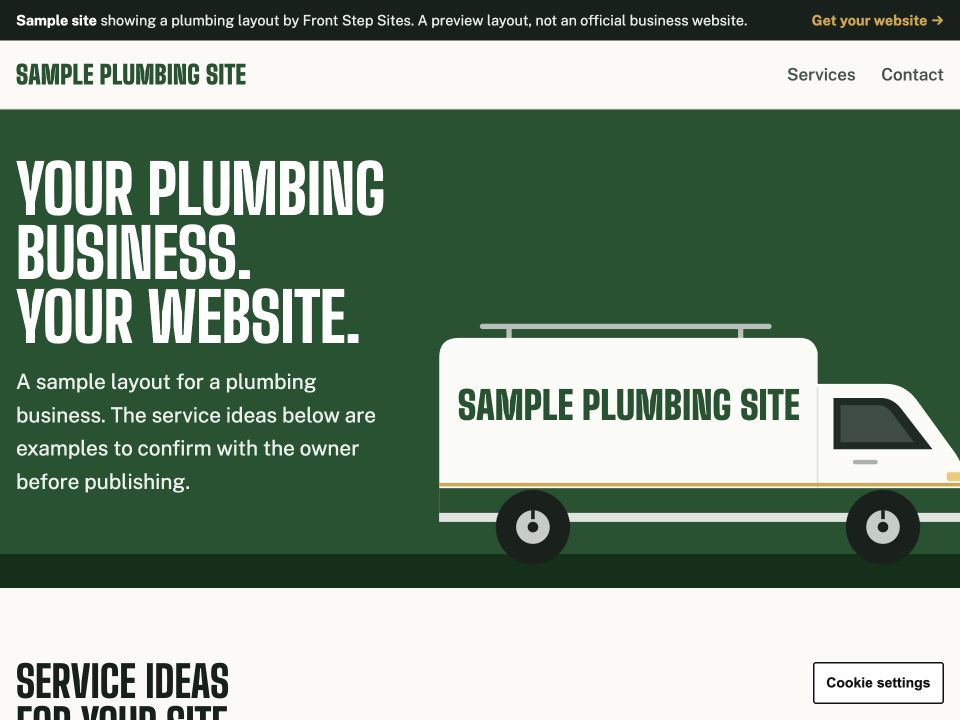
Customer task: Preview a plumbing identity and complete a local sample inquiry.
Interaction: The sample form checks for a name and phone number, then shows a preview confirmation. Nothing is sent or stored.
Three page decisions
- The van-livery opening can use a supplied business name, town, phone number, and color.
- Unknown phone and location details stay hidden instead of becoming invented claims.
- Service ideas are clearly labeled as examples for the owner to confirm.
Fictional example — no customer or result is represented
Cleaning design
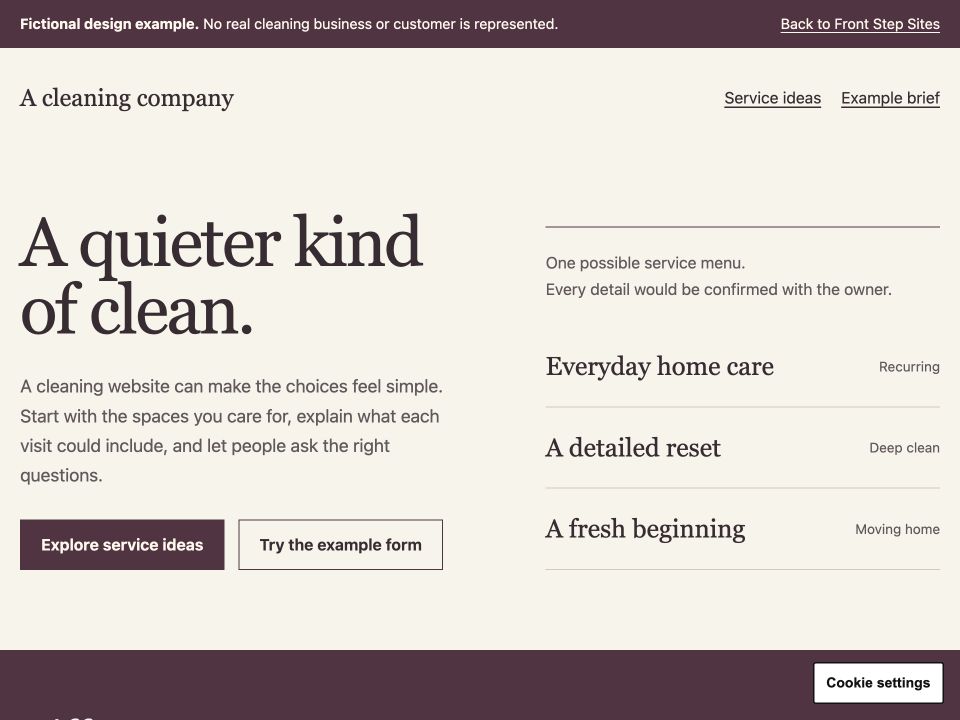
Customer task: Compare cleaning needs and preview the questions a visitor would hand off.
Interaction: The cleaning brief lets a visitor choose an example cleaning type and preview a question. No request is sent, saved, or booked.
Three page decisions
- The service menu separates recurring care, a detailed reset, and moving-home work.
- Practical preparation questions replace made-up reviews or credentials.
- The brief states its limits before the visitor enters an example question.
What each example demonstrates
| Customer need | Plumbing sample | Cleaning design |
|---|---|---|
| Urgent call | Not demonstrated | Not demonstrated |
| Planned estimate | Sample inquiry preview | Example brief preview |
| Service scope | Four example plumbing jobs | Three example cleaning types |
| Service area | Not demonstrated on the default sample | Not demonstrated |
| Proof | Not demonstrated | Not demonstrated |
| Inquiry handoff | Local confirmation; nothing sent | Local brief result; nothing sent |
What does this trade website example actually prove?
This trade website example proves that a page can be planned around two common customer situations without pretending a fictional business has customers. The source says: "One visitor has a fallen limb blocking a driveway; another wants a large backyard tree assessed before planning a patio. What should your tree service website show to help both people? Give them separate, clear routes to urgent contact and planned estimates, with enough detail to understand the work you actually handle."
That passage comes from the site's tree service website guide. It supports the page structure below: urgent and planned work need different routes, and each route needs enough detail for a visitor to recognize the right next step.
The evidence has a clear limit. The plumbing and cleaning samples are fictional product walkthroughs, not customer sites. They demonstrate working local interactions and page decisions, but they provide no customer result, conversion study, or promise of a particular number of calls.
For a shorter homepage plan using the same source, see the five-section tree service website example.
What are the 8 sections of a trade business website?
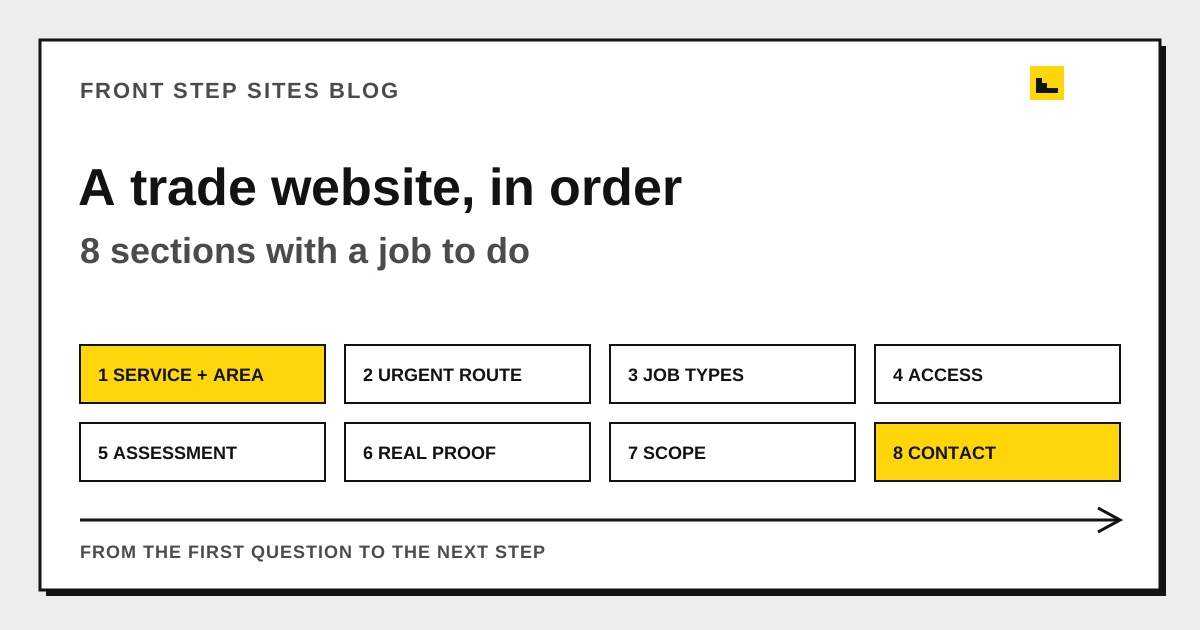
The 8 useful sections are a first-screen answer, an urgency route, service choices, service-area and access details, an assessment process, real proof, scope and cleanup details, and a contact handoff. This order follows the questions a property owner asks while deciding if the business fits the job.
| Order | Website section | Question it answers |
|---|---|---|
| 1 | First-screen answer | Do you handle this kind of work in my area? |
| 2 | Urgent or planned route | Should I call now or request an estimate? |
| 3 | Service choices | Which page matches removal, pruning, or stump work? |
| 4 | Area and access | Can your crew serve and reach this property? |
| 5 | Assessment process | What information do you need before quoting? |
| 6 | Project proof | Have you shown real, relevant work and current qualifications? |
| 7 | Scope and cleanup | What remains when the crew leaves? |
| 8 | Contact handoff | What happens after I call or submit the form? |
The table is a planning tool. Some small sites can place all 8 sections on one long page; others need a homepage plus separate service pages. The small business website creation guide covers the wider build sequence once the page plan is clear.
Why should the first screen name the service and area?
The first screen should name the trade's main service and real coverage area because a new visitor is checking fit before reading the company story. A tree service can name removal, pruning, and stump grinding only when it performs all three. A working call button and a planned-estimate option should sit close to that answer.
A headline that could belong to any contractor makes the customer do extra work. "Quality service you can trust" says little. "Tree removal and pruning in Cedar County" gives the visitor useful facts, assuming the business really offers those services and covers that place.
List places the crew can serve without stuffing every nearby town into the opening. A service-area page earns its place when the business has distinct information for that location, such as travel boundaries, permit considerations, or a real project.
How should urgent and planned jobs split?
Urgent and planned jobs should split immediately when the trade handles both because the customer timelines are different. A fallen limb across a driveway calls for a visible phone route and honest availability. Pruning before a patio project can use a short estimate form and a normal scheduling explanation.
The same split works elsewhere. An electrician can separate a power-loss call from a planned panel estimate. A garage-door company can separate a trapped vehicle from a future replacement. The page should describe the response the business can actually provide and avoid a round-the-clock promise that staffing cannot support.
Safety copy belongs beside urgent work when it helps a visitor avoid harm. The tree-service source tells people to stay away from unstable trees and electrical lines. It does not coach a homeowner through an inspection. That boundary is part of the page's job.
How should service sections explain the work?
Service sections should explain how one job differs from another, including what the estimate must consider. Removal, pruning, and stump grinding each have their own scope. A customer should understand that stump chips, soil, lawn repair, or hauling may need separate agreement.
A useful service section covers the customer's decision without turning into a textbook. Name the job, the conditions that affect it, what the business checks, and the next step. Keep credentials attached to the person or crew that actually holds them.
For another way to evaluate the underlying platform after the content is planned, the best website builder questions focus on ownership, changes, and exit terms. Those choices affect who can keep each service page accurate later.
Where should a trade website place proof?
A trade website should place proof after the visitor understands the service, then connect each item to a real claim. A narrow side-yard removal photo supports a different capability from an open-lot clearing photo. A caption should state the work shown without publishing a customer's private address.
Proof can include approved project photos, current qualifications, a named assessment process, and genuine reviews. Each item needs verification. A badge with no issuer or a review rewritten into a different meaning weakens the page because the visitor cannot tell what is real.
Label a concept illustration as an illustration. A source walkthrough can explain why sections exist, but it cannot stand in for completed customer work.
What should the page say about estimates and cleanup?
The page should say what affects an estimate and what the customer can expect after the work. In tree service, access, nearby structures, condition, equipment, and disposal arrangements can change the plan. A guessed height from a message cannot settle all of those details.
Cleanup language should use concrete scope. Say if the proposal can include hauling brush, cutting logs, removing wood, grinding a stump, or leaving material as requested. The owner can then confirm the final agreement instead of relying on a broad phrase such as "complete removal."
Other trades have their own version. A painter can state who moves furniture and repairs damaged drywall. A cleaner can distinguish routine service from a move-out job. The facts change with the trade.
How should the contact section hand off the lead?
The contact section should tell the customer which route to use, what information to provide, and when the next step becomes confirmed. A planned tree estimate may begin with a town, a general description, and an optional photo taken from a safe position. An urgent request may need a phone call.
Keep forms short enough to complete on a phone. Test that the message arrives in the correct inbox, the phone link dials the correct number, and the confirmation does not promise an appointment before a person reviews the request. A launch checklist should include those checks; the Google Sites business launch checklist offers a platform-specific version that still applies to the customer's path.
Why does mobile order matter for a trade website?
Mobile order matters because the main service, contact route, and job choice must remain understandable on a narrow screen. Google Search Central says Google uses the mobile version of a site's content, crawled with its smartphone agent, for indexing and ranking in its mobile-first indexing guidance. Google publishes the rules for its own crawler, so it is the primary source for that indexing behavior.
That statement supports testing the page on a phone, with no guarantee that one section order earns a ranking. Open the page at a narrow width, follow the urgent route, use the estimate route, and return to the services without losing the contact option. These checks reveal more than a desktop mockup.
Frequently asked questions
Is this a real tree service customer website?
No. It is a source-backed walkthrough of Front Step Sites' existing tree-service guide. No customer, testimonial, call result, or conversion rate has been invented.
Do all trade websites need 8 separate pages?
No. The 8 items are sections or information jobs. A small business can combine them on one page, while a company with several distinct services may give each service its own page.
What should go first on a tree service website?
Start with the real services, service area, and the correct contact route. If the company handles urgent storm work and planned care, make those paths distinct without overstating availability.
Can I copy the same order for plumbing or electrical work?
Yes, as a planning pattern. Replace every tree-service detail with the trade's real jobs, risks, estimate factors, service area, proof, and response process. Keep the customer questions in the same practical order.