Trade Website Example: 5 Tree Service Sections
A useful trade business website example leads with the service, area, and contact route, then explains services, shows verifiable proof, defines the service area, and ends with a short inquiry. This five-section tree service walkthrough shows what each section needs to accomplish without inventing a company, review, or customer result.
By Logan Moore · Updated October 20, 2026
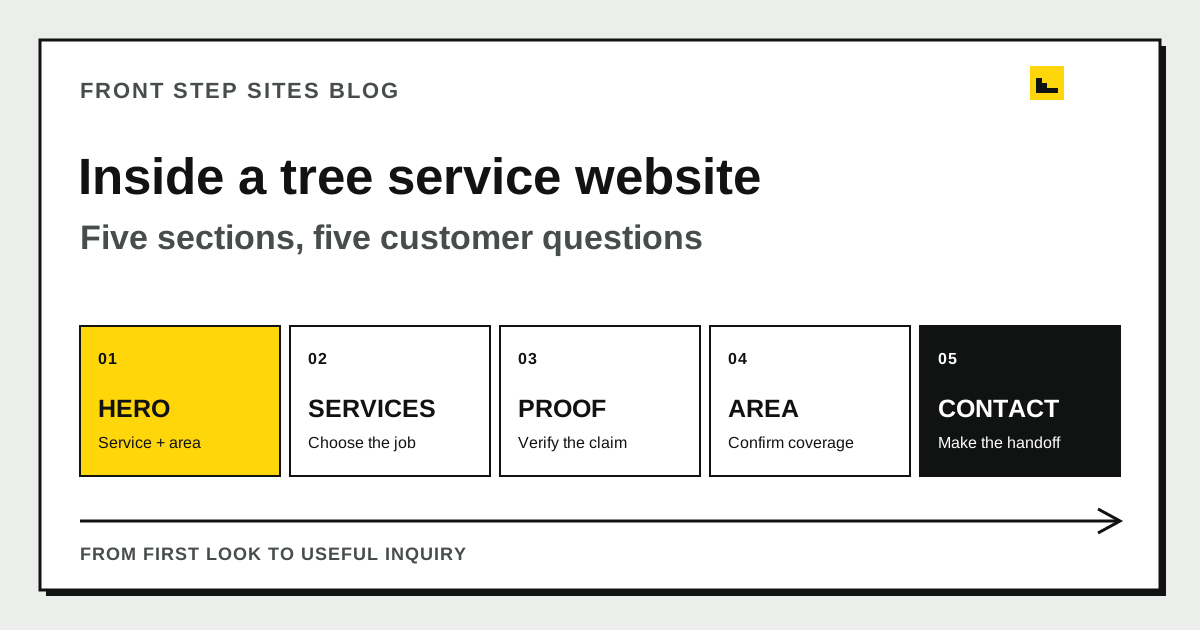
A useful trade business website example leads with the service, area, and contact route, then explains services, shows verifiable proof, defines the service area, and ends with a short inquiry. This five-section tree service walkthrough shows what each section needs to accomplish. It is a planning model with no customer website or performance claim behind it.
What does this trade business website example show?
This trade business website example shows one homepage path for a tree service: hero, services, proof, service area, and contact. Each section answers one decision a property owner makes before calling or requesting an assessment.
The site's source guide frames the underlying problem this way: “One visitor has a fallen limb blocking a driveway; another wants a large backyard tree assessed before planning a patio. What should your tree service website show to help both people? Give them separate, clear routes to urgent contact and planned estimates, with enough detail to understand the work you actually handle.”
That source supports two customer paths. It provides no evidence that this layout will increase calls or that a real tree company uses it. The broader 8-section trade website guide gives urgency, access, assessment, and cleanup their own planning jobs. This walkthrough folds those details into five visible homepage sections.
| Page order | Section | The visitor's question | Useful next action |
|---|---|---|---|
| 1 | Hero | Do you handle my kind of work here? | Call or request an assessment |
| 2 | Services | Which service matches my problem? | Open the relevant service detail |
| 3 | Proof | Can I verify the claims I just read? | Review a real project or credential |
| 4 | Service area | Will the crew travel to my property? | Confirm the town and access details |
| 5 | Contact | What information should I send? | Submit a short request or call |
After outlining the five sections, use the tree service website guide to plan the supporting pages, run the tree service local SEO checklist, and use the tree service Google Business Profile guide to keep the listing's services, coverage, availability, and contact details consistent with the site.
What should the hero section say first?
The hero section should state the real tree services, coverage area, and correct contact route before introducing the company's story. A usable draft might read “Tree removal and pruning in Cedar County” only when the business performs both services and covers that area.
Place an ordinary phone route beside a planned-assessment route when the company handles both urgent and scheduled work. The phone label can say “Call about current availability.” The form label can say “Request an assessment.” Neither phrase promises a crew arrival time.
The hero has three fact checks:
- Every named service is currently offered.
- Every named town or county is actually served.
- The phone number reaches the business responsible for the work.
Match the hero's business name, services, and coverage facts to the records the owner has verified. The tracked tree-service guide supports naming only real services and towns the company covers. That consistency avoids contradicting the business's own current information, but it offers no ranking guarantee.
How should the services section divide tree work?
The services section should divide tree work by the customer's job instead of placing every request under a broad “tree care” label. Removal, pruning, stump grinding, and storm-related work involve different questions and scopes.
Use one short block for each service the company truly provides:
- Tree removal: explain that the tree, access, nearby structures, and cleanup affect the proposed scope.
- Pruning: state how goals and tree condition are assessed before work is agreed.
- Stump grinding: say whether it is quoted separately and what happens to grindings.
- Storm-related work: give the current contact method and honest availability.
The service descriptions help a visitor choose a conversation. Leave tree diagnosis out of generic symptom lists, and never tell a homeowner to approach unstable limbs. The full tree service website guide explains the safety and assessment boundaries behind these sections.
What belongs in the proof section?
The proof section should connect each claim to evidence the business can verify. A real project photo, accurate caption, current credential, or faithfully reproduced review can support a specific point.
One project entry could show a completed removal in a narrow side yard, with the owner's permission. Its caption should identify the service and a visible constraint without publishing the customer's street address. A second image might show the agreed cleanup after pruning. That photograph supports only what appears in the frame and caption.
Avoid decorative badges with no named issuer. If one person holds a credential, identify that person and role instead of applying the title to the whole crew. Reviews need genuine wording and permission where required. An illustration can explain a process, but label it as an illustration so nobody mistakes it for customer work.
How should the service-area section work?
The service-area section should name the real territory in a form customers can scan, then explain any practical boundary that affects an estimate. A short county-and-towns list is clearer than a paragraph stuffed with every nearby place name.
The website can tell visitors which towns the crew truly serves without publishing a home address. Use the business's verified coverage facts, and do not stretch the list merely to create more place names.
Add useful operating detail beneath the place names. Explain how access, travel distance, parking, gates, or equipment routes enter the quote process. Give a town its own page only when you have useful, true information for that place. The small business website creation guide can help decide when one homepage is enough and when services need their own pages.
What should the contact section ask for?
The contact section should ask for enough information to start the right conversation while staying easy to finish on a phone. For planned tree work, a name, reachable contact method, town, and short description can be enough for the first response.
Optional photos may provide context when the customer can take them safely. The form must keep people away from damaged trees, climbing, and electrical lines. Confirmation copy should say the request arrived and wait for a person to confirm the appointment.
Put the response process beside the form. Say who reviews it and what happens next using the business's real practice. Then submit a labeled test inquiry from a phone and confirm it reaches the correct inbox. The Google Sites launch checklist includes the same practical checks for forms, navigation, and mobile pages.
Why does the five-section order work on a phone?
The five-section order works on a phone because the core answer and contact route arrive before the longer proof and process details. A visitor can confirm fit quickly, then continue reading if the job needs more consideration.
Google Search Central's mobile-first indexing guidance says Google uses the mobile version of a site's content for indexing and ranking. It also tells site owners to keep primary content equivalent across mobile and desktop. Google is the primary source for how its crawler handles mobile content.
That guidance supports keeping services, proof, coverage, and contact information available on the mobile page. Google gives no endorsement to this exact five-section order. Test the actual reading path at a narrow width: open the page, choose removal or pruning, find the service area, inspect one proof item, and reach the correct contact route.
How can another trade adapt this example?
Another trade can adapt this example by replacing every tree-service fact with its own jobs, proof, coverage, and handoff. The section purposes stay useful while the content changes.
An electrician might separate troubleshooting from a planned panel assessment. A cleaner might separate recurring home service from move-out work. A garage-door company might separate a trapped vehicle from a future replacement. Each business needs its own availability, safety limits, estimate factors, and evidence.
Keep the five questions visible during the rewrite: Do you handle this? Which service fits? Can I verify the claim? Do you serve my property? What happens after I contact you? If a paragraph answers none of them, it may belong on another page.
Frequently asked questions
Is this a real tree service customer website?
No. It is a source-backed planning example built from the site's existing tree-service guidance. It contains no invented customer, testimonial, job result, or conversion statistic.
Does every trade website need exactly five sections?
No. These five sections group the main homepage jobs. A business may separate urgent contact, assessment, access, cleanup, or company details when those subjects need more space.
Should a tree service put “24/7” in the hero?
Only when the company can support what a customer would reasonably understand that promise to mean. A safer label is a direct invitation to call about current availability.
Can a trade website use stock project photos?
Stock images can illustrate a general subject when clearly appropriate. They provide no proof that the business completed the pictured work. Use approved, accurately captioned project photos for claims about experience.
The short version
Draft each section from verified business facts, then use a phone to follow the page from the first service statement to a test inquiry. Turn every missing fact into a question for the owner and leave polished filler out.